


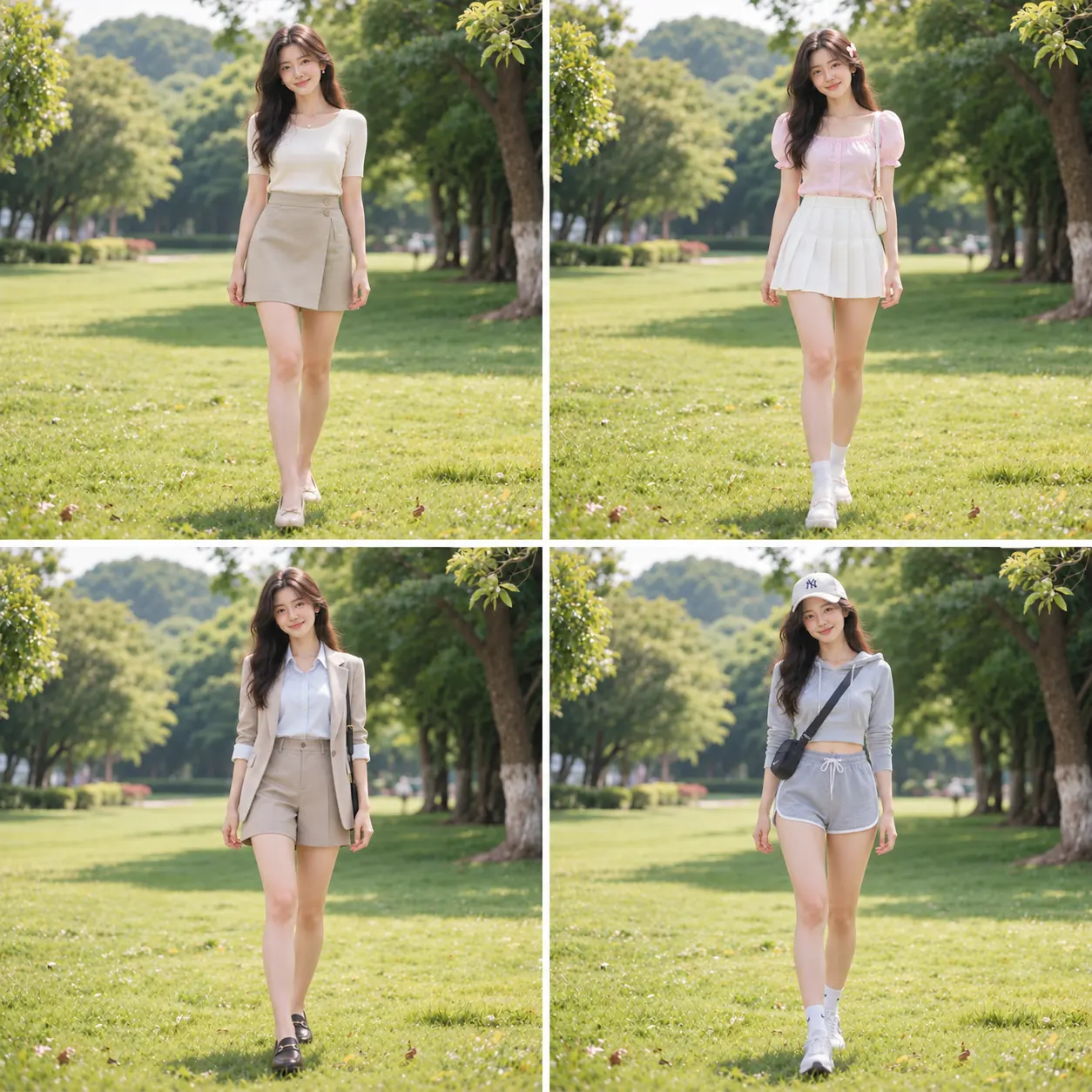
WHAT IS GPT IMAGE 2.5?
What is GPT Image 2.5?
GPT Image 2.5 is an OpenAI model for creating and editing images. Use text or reference images on Image2.ing to make product photos, posters and illustrations, then refine the details.

Start with text, images or sketches
Describe a scene or upload a reference. Define the subject, composition and materials to give your idea direction.
Refine your image with references
Adjust backgrounds, lighting and details. Specify the character features and product appearance to preserve.
Bring words and visuals together
Arrange copy and visual hierarchy for posters, packaging and infographics. Review text and key details after generation.
Explore and refine your next version
Use a generated image as your next reference. Refine composition, mood and details toward the result you want.
02 · Use cases
Common use cases
Use GPT Image 2.5 for product shots, social-media creatives, ad assets, posters, infographics, and presentation visuals, or combine it with reference images for editing and style transfer.

Marketing & social
Campaign hero visuals, social posts, banners, thumbnails, and product storytelling.

Ecommerce image design
Create product listing images, feature graphics and detail-page visuals for Amazon, Shopee, Taobao and other ecommerce platforms.
Open ecommerce design tool
Posters & infographics
Short headlines, labels, diagrams, and visual hierarchy — always proofread text before publishing.
Open poster design tool
UI & presentation concepts
Interface directions, presentation visuals, editorial layouts, and refinable design references.

Logo & brand design
Explore logo concepts, brand colors and visual styles, then extend them to business cards, packaging and storefronts for a cohesive brand identity.

Concept art & illustration
Characters, environments, storyboards, stylized illustrations, and multiple art directions for the same brief.
03 · Prompts
10 prompt examples
Load an example into the workspace, then adjust the subject, scene, color, copy, and output ratio to fit your needs.

Premium orange juice ad
A ready-to-use creative prompt with an illustrative reference image.
Fresh orange juice in a clear glass, sliced oranges and droplets, warm orange background, backlighting to reveal texture, advertising photography with headline space above.

Coconut sago summer poster
A ready-to-use creative prompt with an illustrative reference image.
创作一幅全新的高端椰汁西米露甜品广告。采用竖向 3:4 海报构图。清凉舒爽的夏日氛围、淡冰绿松石色与奶白色的色调、照片级写实甜品摄影风格以及优雅的深青色中式衬线字体,但需设计全新的构图布局。主体画面:前景左侧偏中位置,摆放着一个宽口矮身、带竖条纹理的透明玻璃甜品碗,盛装着丝滑的白椰奶、晶莹剔透的圆润西米、金黄色的芒果丁和精致的椰肉丝。右后方放置一个冰镇透明玻璃瓶,配有拉丝银色旋盖,瓶内装有同款甜品,瓶身带有逼真的冷凝水珠,贴有细长的象牙白标签,印有清晰的竖排中文字样“椰汁西米露”。一把光洁的勺子从左上方斜向伸入,盛着令人垂涎的西米与芒果,勺底悬挂着一滴欲滴的椰奶。画面最右侧隐约可见半个椰子,湿润的淡水绿色石面上散落着几块透明冰块,背景投射着柔和的热带棕榈叶阴影,采用自然的漫射背光,呈现逼真的食物质感与高光,整体风格精致高端、简洁清爽。预留顶部和底部文字空间,确保不遮挡食物主体。顶部居中标题为优雅深青色中式衬线字体的“一口椰香,清凉入夏”,下方配有较小字号的副标题“把夏日的清甜,装进这一碗”。底部醒目展示超大号主品名“椰汁西米露”,下方为字间距适中的英文“COCONUT SAGO DESSERT”,最下方是一个小型胶囊状轮廓框,内含“椰香浓郁 / 清甜爽滑”字样。确保中文字符拼写准确、字体清晰易读、留白雅致且信息层级分明。仅交付全出血(无白边)成品海报,不包含网页UI元素、水印、价格或额外文字。

Retro Miami illustration
Recreate an ’80s poster with a single prompt
一张 1980 年代迈阿密风格的插画海报。画面中央站着一位穿米白色西装、 内搭玫粉色衬衫的虚构男性角色,手持雪茄,神情自信,面容为原创设计。 背景是装饰艺术风格的临街建筑、成排棕榈树与远处的粉蓝色高楼天际线, 左下角停着一辆白色 80 年代风格跑车(不指定品牌,车标处留白)。 天空为饱和的青蓝色配零散白云。厚涂数字插画风格, 高饱和撞色,硬边光影,粗黑描边。画面内不要出现任何文字、 Logo 或品牌标识。角色为完全虚构,不对应任何真实人物。

Underwater fashion editorial poster
A ready-to-use creative prompt with an illustrative reference image.
Create a 9:16 vertical underwater fashion editorial poster. CUSTOM INPUTS: Subject: [adult woman / appearance / hairstyle] Dress: [color, material, silhouette, exposed shoulders, back, waist or leg] Handheld object: [flower / glass slipper / mirror / transparent mask / perfume bottle / other] Pose and expression: [body direction, hand gesture, gaze, emotion] Main title: [original English title] Small tagline: [short original sentence] Color palette: [main water color + dress color + accent color] Show an adult woman floating naturally beneath the water surface. The upper part of the frame must clearly reveal realistic ripples, refraction, caustic highlights and a distorted partial reflection of the subject. She wears an elegant sculptural dress rather than a loose shirt. The design should reveal part of her shoulders, back, arms, waistline or legs, while the skirt and ribbons drift naturally through the water. Keep the body silhouette visible instead of covering her completely with fabric. The subject holds one visually recognizable object in her hand. The object should be large enough to read clearly, but must not block her face or body. It should interact naturally with underwater light, buoyancy and movement. Her long hair, dress, ribbons, bubbles and handheld object should follow a consistent water-current direction. Preserve believable underwater physics, natural fabric weight and subtle motion. Use cinematic blue underwater lighting with light beams entering from above or behind the subject. Add realistic skin texture, fine wet hair strands, small irregular bubbles and suspended particles. Keep the face clear, expressive and alive, without plastic skin or CGI smoothness. Build a refined fashion-magazine composition with strong negative space and editorial hierarchy. Integrate the exact main title “[MAIN TITLE]” into the scene using oversized high-contrast serif typography. Allow selected letters to be partially hidden behind the body, dress or object. Enhance the typography with subtle underwater refraction, stretched letterforms, translucent layering, displaced reflections and caustic light textures. Add the exact small tagline “[TAGLINE]” beneath it in a restrained layout.

Anime character sheet
A ready-to-use creative prompt with an illustrative reference image.
Create a polished original anime character design reference sheet for a website illustration about anime character sheets. Landscape 4:3 canvas. Sophisticated Japanese animation production artbook layout on warm ivory paper, thin pale lavender grid dividers, ample breathing room, navy and violet accents. Main character: an adult female celestial courier, short silver-lavender bob haircut with one small star hair clip, amber eyes, cropped navy utility jacket over ivory high-neck shirt, practical navy shorts with opaque leggings, white and violet ankle boots, compact crossbody messenger bag. Appealing original anime design, restrained detail, consistent clothing and anatomy. Left two thirds: three complete full body orthographic views of EXACT SAME character front, side, back, identical scale and aligned feet, all fully visible. Right third: four clear head expression studies in a two by two arrangement, happy, focused, surprised, calm; below them neat separate accessory studies of messenger bag and star-shaped compass, then five circular palette swatches. Crisp delicate linework, tasteful cel shading, professional high quality anime illustration, informative composition. Small editorial English labels only: 'CHARACTER SHEET', 'LUNA', 'FRONT', 'SIDE', 'BACK', 'EXPRESSIONS', 'DETAILS'. Avoid large blocks of text. No webpage UI, no browser frame, no abstract sculptures, no photo realism, no watermark. Strong visual hierarchy and refined spacing, useful readable visual at website card size.
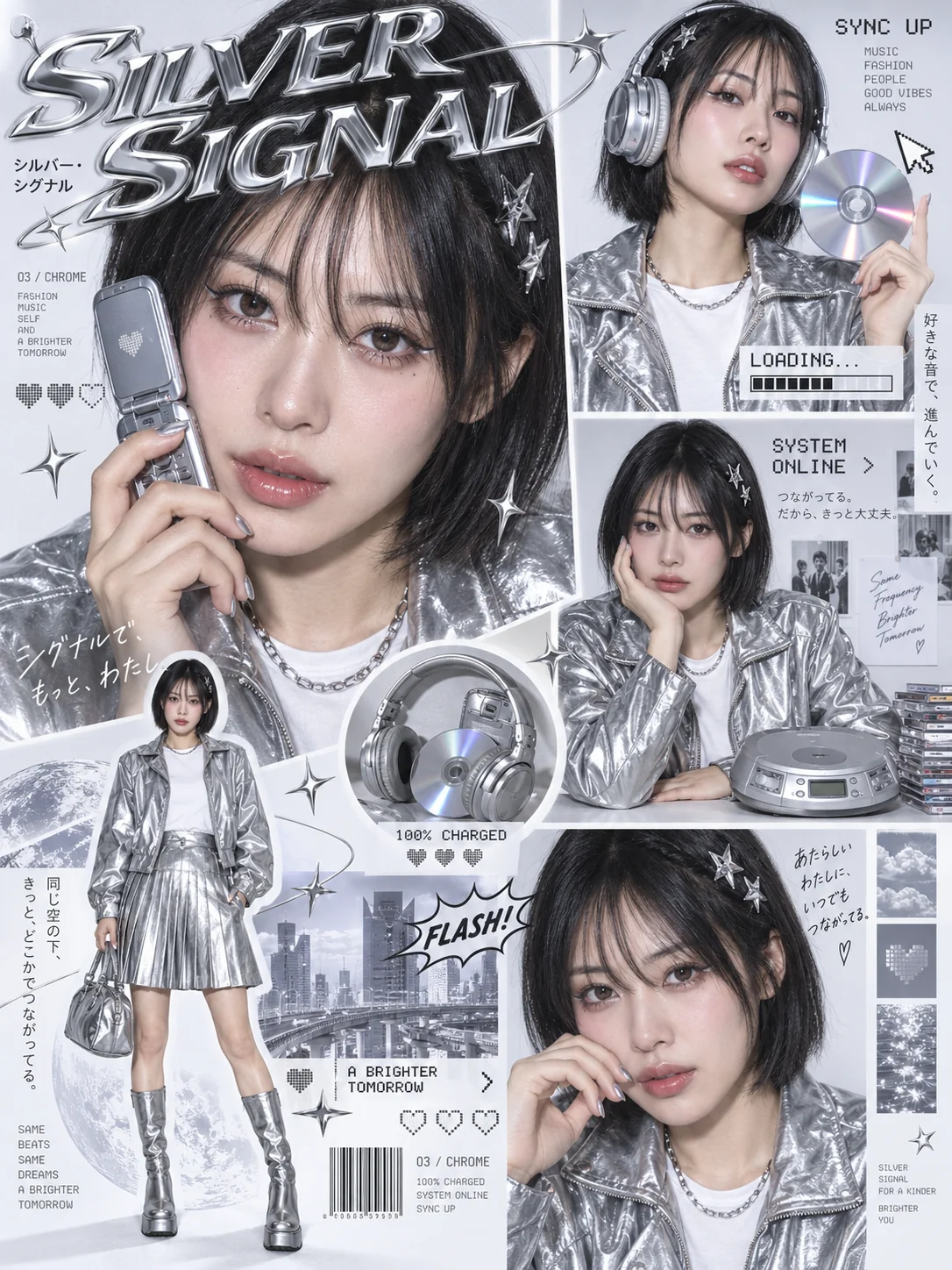
Y2K silver cyber collage poster
A ready-to-use creative prompt with an illustrative reference image.
竖版3:4,Y2K日系时装杂志与偶像专辑内页风格,银灰色Cyber主题,高密度摄影拼贴海报。 人物:一位成年亚洲女性,黑色齐下巴短发、空气刘海、银色星星发夹,精致眼线、淡粉腮红、水润唇妆,保留真实皮肤微纹理。穿银色金属光泽夹克、白色T恤、银色百褶短裙和银色长靴,搭配银色链条项链。所有照片保持同一张脸、同一发型与服装。 构图:左上是占据近半幅画面的大幅面部特写,手持银色翻盖手机贴近脸颊;右上是戴银色头戴耳机、手举CD的半身照;右侧中部是坐在桌前单手托腮的照片,桌上放复古CD播放器;左下叠加完整全身人物抠图;右下安排另一张面部近景;中央加入耳机与CD的圆形特写。照片大小错落,用细白边、斜切边框和局部叠压组织画面。 排版:顶部大标题“SILVER SIGNAL”,采用夸张斜体衬线字、立体镀铬效果、金属高光和浮雕边缘。搭配像素字“SYNC UP”“LOADING…”“SYSTEM ONLINE”“100% CHARGED”,少量日文竖排短句、条码、像素爱心、鼠标箭头、进度条、银色四角星及“FLASH!”漫画气泡。点缀低饱和城市、月球、云朵与水面小图。 白底棚拍,正面直闪,轻微柔光泛晕,银色面料反射清晰,整体配色为银白、冷灰、黑色与少量淡紫反光。杂志信息层级突出,画面丰富但有秩序,文字不遮挡眼睛与面部。 避免:不同人物混入、身份漂移、普通等分相册拼图、塑料皮肤、手指畸形、肢体错位、品牌Logo、水印、大段乱码正文。

Old photo restoration
A ready-to-use creative prompt with an illustrative reference image.
与参考图保持完全相同——面孔、年龄、表情、姿势、服饰、背景及构图裁剪均与参考图一致,但经过了精细的修复、锐化及微妙的上色处理。

Consistent fashion 9-grid
A ready-to-use creative prompt with an illustrative reference image.
Generate a hyper-realistic, 9:16 studio-style collage featuring an adult man (facial match to the uploaded photo), set against a simple light gray background with strong, dramatic lighting. The composition should be elegant and striking, arranged in a 3x3 grid layout, with each square showcasing a unique facial expression and playful body movement to add personality and intrigue.Each expression should feel distinct, from pointing with authority, laughing joyfully, pretending to sleep in a relaxed way, drinking with casual coolness, winking mischievously, to thinking thoughtfully and gesturing dynamically. Every pose should captivate with energy and evoke mood, drawing the viewer in.For added drama and depth, make each pose appear as if it’s bursting through torn white paper frames, creating a 3D effect like the man is breaking out of the background—infusing the image with tension, energy, and movement.Each square features a different outfit, perfectly complementing the mood of the expression:Casual, laid-back t-shirtSemi-formal blazer, sharp and refinedSporty hoodie, active and effortlessHumorous or eccentric attire, playful and boldCreative and artistic fashion choices, with unexpected flairThe expressions should be dynamic, ranging from fun and playful to serious and thoughtful, with each frame showcasing a different emotional layer. Skin texture, lighting, and details should be hyper-realistic, ensuring every fold of clothing, facial feature, and lighting shadow is sharp and impactful.The overall studio-style aesthetic should balance modern sophistication with bold creativity, making each pose feel cinematic, powerful, and engaging, as if the man is stepping out of the scene, commanding attention with every shift.
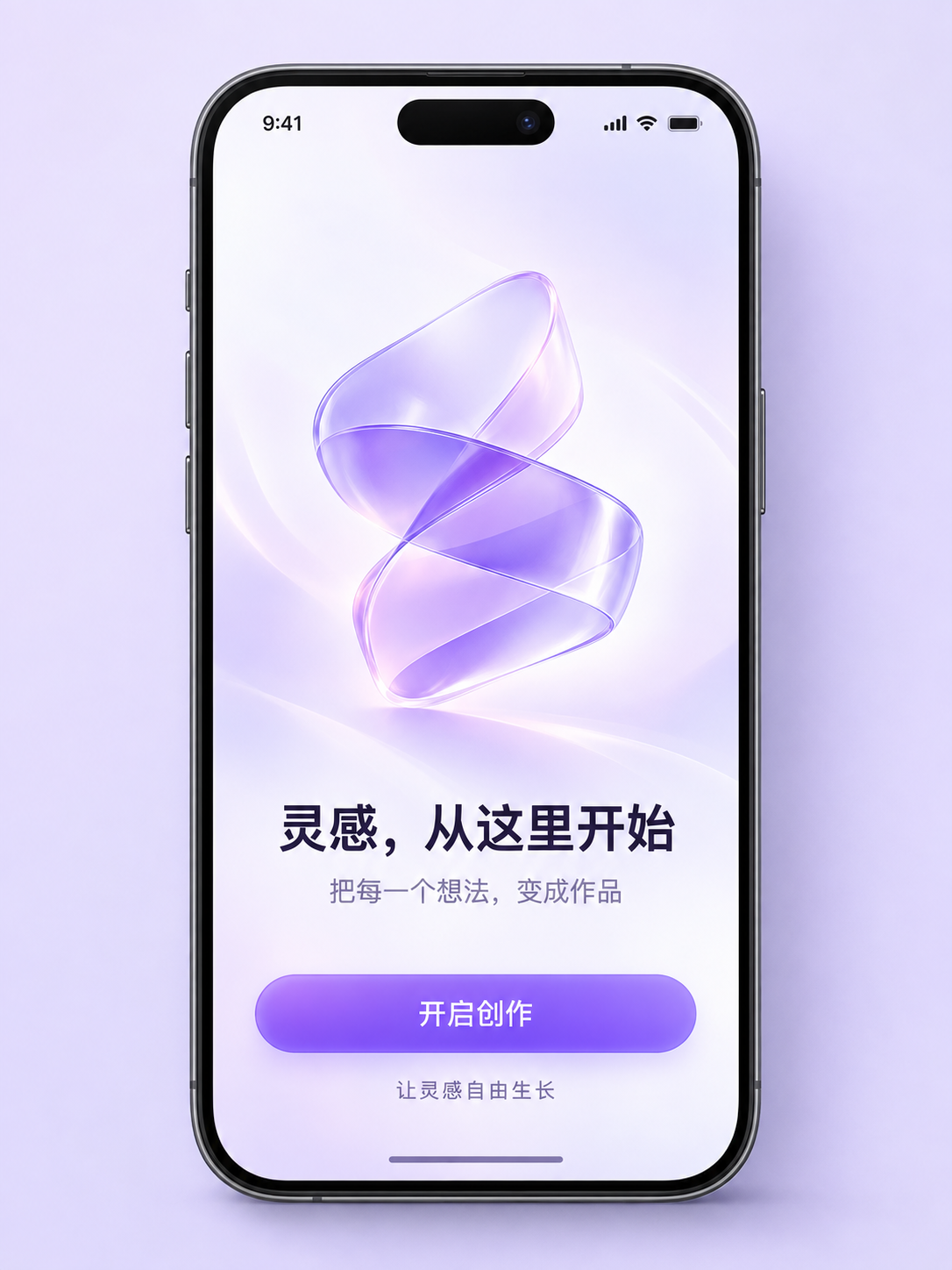
Chinese UI splash screen
A ready-to-use creative prompt with an illustrative reference image.
Create a polished Chinese-language mobile app launch / welcome screen presented as a premium UI design showcase. Portrait canvas, 3:4 aspect ratio. One large straight-on modern smartphone with thin graphite frame, entire phone visible with generous outer margins, occupying about 78% of canvas height. Pale lavender studio background with subtle soft shadow. Inside the screen: refined white-to-lavender background, a luminous abstract translucent purple folded-ribbon app symbol in the upper middle, crisp beautifully typeset Simplified Chinese title “灵感,从这里开始” below the symbol, smaller subtitle “把每一个想法,变成作品”, and a wide purple rounded button reading “开启创作” near the bottom. Beneath the button a small quiet line “让灵感自由生长”. All Chinese text must be perfectly readable and exact, elegant modern sans-serif typography, meticulous spacing and clear hierarchy. Small minimalist status bar at top. Sophisticated restrained visual design, realistic glass material in the central symbol, subtle gradients, premium product presentation. All screen content fully visible, no cropping. Only one screen, no duplicate phones, no surrounding labels, no watermark, no cup, no English titles, no landing page card chrome.
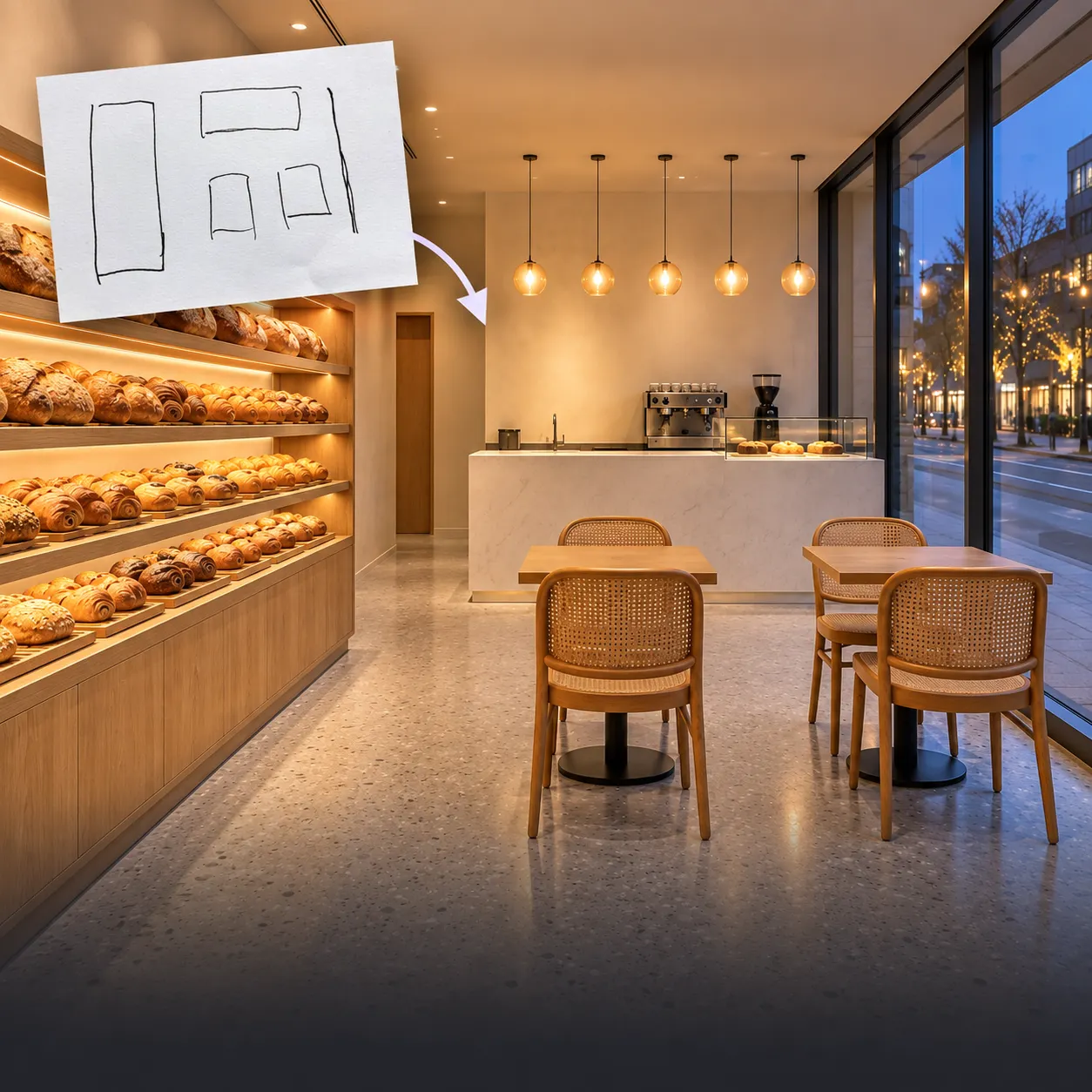
Bakery sketch to realistic interior
A ready-to-use creative prompt with an illustrative reference image.
Turn the uploaded interior sketch into a photorealistic bakery. Preserve the counter, door and window positions, layout and camera angle. Use light oak, cream walls and warm lighting, with bread displayed in a glass cabinet. Render realistic materials and natural shadows; do not add doors, windows or text.
04 · Workflow
How to use GPT Image 2.5
01
Write a specific prompt
Describe the subject, environment, composition, lighting, style, and where the image will be used.
02
Add references if needed
Only upload images you have rights to, and state which parts must stay or change.
03
Choose output settings
Pick from the available ratios and resolutions, and check the credit estimate next to the generate button.
04
Generate and refine
Review the result, give clear feedback by editing the prompt, and regenerate as needed.
Sources & fact verification
Model facts may change. The links below distinguish OpenAI official sources from Image2.ing platform information.
Create with GPT Image 2.5
Plan your prompt, learn how to preserve details in reference edits, and compare model options before starting your next image.
Open the GPT Image 2.5 AI image generator05 · FAQ
Frequently asked questions
Q1.Is Image25 free to use here?
Image generation on Image2.ing uses credits. Check the estimate in the workspace before generating and visit the pricing page for credit packages. This is not an unlimited free generator.
Q2.Should I choose Flare or Sunburst?
OpenAI positions Flare for everyday creation and speed, and Sunburst for more precise editing. Image2.ing exposes the options shown in its workspace; this page does not imply that both API variants can be selected separately.
Q3.Is this the OpenAI official site?
No. Image2.ing is an independent third-party platform that calls the official OpenAI API; we are not affiliated with, endorsed by, or operated by OpenAI.
Q4.What is the difference between GPT Image 2.5 and 2.0?
Versus 2.0, 2.5 brings up to 50% lower latency, higher reference-image subject fidelity, stronger precision editing, more stable multi-turn consistency, and better Chinese text rendering.
Q5.Can I use GPT Image 2.5 online here?
Yes. Open the workspace on this page, type a prompt or upload reference images, pick a ratio and quality, and click generate.
Q6.Is GPT Image 2.5 good for e-commerce listing images?
Yes. The improved product consistency, reference fidelity, and Chinese copy rendering make 2.5 well suited to Amazon, Shopee, Taobao, and similar platforms.
Q7.Can GPT Image 2.5 edit an existing image?
Yes. Switch to "Reference image" or "Image editing" mode, upload a reference, and describe the changes in your prompt.
Q8.How do I write better prompts for GPT Image 2.5?
Use a "subject + scene + composition + lighting + style + exclusions" structure. The more specific, the better. You can also one-click load any of the 10 prompt examples on this page.
Q9.Can GPT Image 2.5 generate images with Chinese text?
Yes, the Chinese text rendering is better than 2.0. We still recommend keeping key headlines to 5–10 characters and double-checking spelling before publishing.
Q10.Which resolutions are supported?
1K, 2K, and 4K. You can see the credit estimate in the workspace before generating.
Q11.Can I one-click use the prompt examples?
Yes. Click the "Use this prompt" button on any example card to load it into the workspace on this page.
Q12.Where do the model facts on this page come from?
Model version and capabilities are sourced from OpenAI official documentation and announcements; credits, parameters, and limits reflect Image2.ing platform configuration.
Related models & tools
From product imagery to brand design, find the right tool for your next idea.
Start creating with GPT Image 2.5
Take your idea into the workspace, add references, adjust settings, and review credits before generating.
Open the GPT Image 2.5 workspaceImage2.ing is an independent multi-model creation platform that calls official APIs. We are not affiliated with, endorsed by, or operated by OpenAI.